


When you play a game for the first time, you usually keep the standard settings. Then, after a few rounds, you start to tweak them on a hunch. A nudge to the DPI here, a notch on the in-game slider there, and now and then you stumble onto a sweet spot where everything feels right. But of course, you don’t write any of it down. So a good day shows up, you feel unstoppable, and you have no clue which change earned it. Sound familiar?
That is the exact mess an eDPI calculator clears up. It takes your mouse feel and turns it into one plain number you can read, copy, and trust. The only thing is to figure out how to use it and play League of Legends like a pro.
What eDPI is
eDPI stands for effective dots per inch. It is your real sensitivity, the one you need to choose right, so your mouse and your game stop arguing with each other.
Your mouse DPI on its own tells you almost nothing. A friend brags about playing on 800 DPI, and you assume their aim is twitchy and fast. But if their in-game sensitivity sits way down low, their cursor might crawl slower than yours does at 400. DPI is only half the story. The in-game sensitivity is the other half, and eDPI is what you get when you multiply the two together.
Two cars can share the same engine but run different gearing. Same horsepower on paper, a totally different feel on the road. DPI is the engine. Sensitivity is the gearing. eDPI is how the car actually drives. That is why a good mouse sensitivity converter starts with this number instead of any single setting.
How to calculate eDPI
The math is one line:
eDPI = DPI × in-game sensitivity
So you need two numbers. Your DPI lives in your mouse software, like Logitech G HUB or Razer Synapse, and many mice also have a small button that cycles through DPI presets. It might look like this:
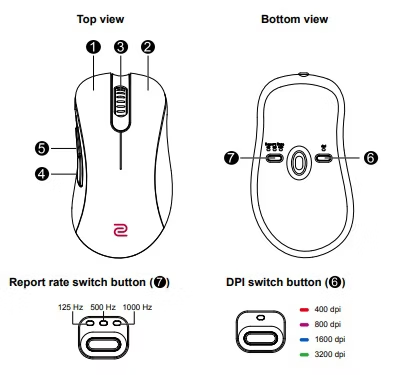
If you have never touched it, it is most likely sitting at 800 or 1600. If you aren’t sure, go to DPI Analyzer and follow the instructions.
Your in-game sensitivity is in the game’s options menu, usually under a Controls or Mouse tab.
Once you have both, multiply them. A few examples:
- 800 DPI × 0.5 sensitivity = 400 eDPI
- 1600 DPI × 1.0 sensitivity = 1600 eDPI
- 400 DPI × 2.0 sensitivity = 800 eDPI
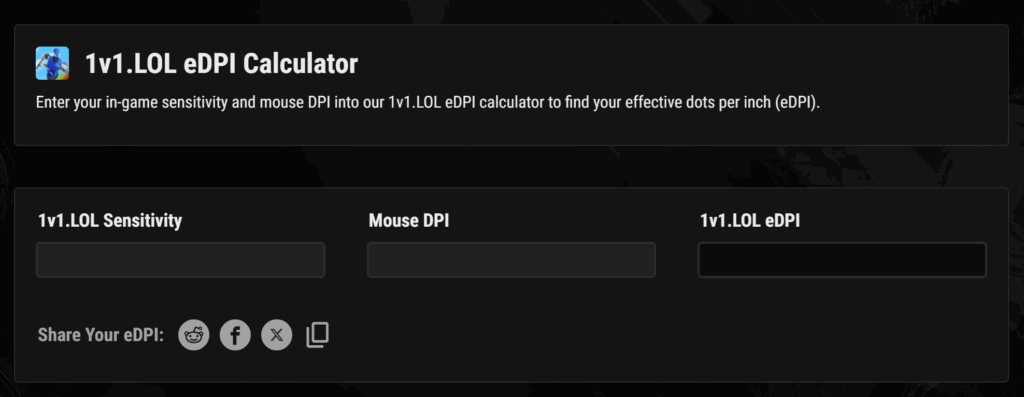
You can multiply by hand, but an eDPI calculator is faster, especially when you want to calculate eDPI for a few different setups and compare them side by side. You type in your DPI and sensitivity, and it gives you the number. It usually looks like this:
Why your eDPI number is worth knowing
So why bother? There are a few good reasons:
First, consistency. The day your old mouse dies, and a new one arrives, you do not want to relearn your aim from scratch. If you know your eDPI, you set the new mouse to a DPI you like, work out the sensitivity that hits the same number, and your muscle memory barely notices the swap. Your hand keeps its habits.
Second, comparison. Pro players and streamers share their settings all the time. But their DPI means nothing to you unless you can line it up against your own. eDPI gives everyone a common language. You see a player you admire runs a certain eDPI, and you finally have a real reference point instead of a random DPI number.
Third, and maybe the best one, it stops the endless fiddling. Random tweaking feels productive, but it mostly just resets your muscle memory over and over. When you track one number, you can make a small, deliberate change, test it for a week, and know precisely what moved.
eDPI and League of Legends

eDPI was born in aim-heavy shooters like Valorant and CS2, where precise aim decides the fight. League plays differently. You click to move, click to attack, and pan the camera around the map, so your cursor is a pointer, not a crosshair.
That makes the classic eDPI formula a loose fit. There is no in-game aim sensitivity driving the feel, and League’s mouse setting is actually tied to your Windows pointer speed, which is why most guides suggest leaving it at the default and changing your DPI instead. Adjust both, and you can turn mouse acceleration back on by accident and undo your own work.
Still, League of Legends DPI matters. It sets how fast your cursor sweeps across the map and how precisely it lands. Higher DPI moves quickly, which helps with camera control and fast clicks. Lower DPI moves more slowly but lets you place the cursor with more care for skillshots and last-hits.
So, what is the best DPI for League of Legends?
There is no single magic figure, and anyone who swears there is one is probably selling a mouse. But the trends give you a clear starting point. League rewards speed and map awareness, so most players run higher DPI than they would in a shooter.
- A common range sits around 1200 to 1600 DPI with the in-game sensitivity left at its default of 50.
- Plenty of high-level players, like Faker and Chovy, push into the 1500 to 3000 range, while some sit near 800 when they value control over speed.
- Shooter players, for comparison, often stay at 400 to 800 DPI, which usually feels too slow in League.
To find DPI for League of Legends that suits you, start near 1600 and leave the in-game settings alone. Play for a few days and watch two things: can you move the camera and click commands fast enough, and can you still place your cursor where you mean to?
Overshooting last-hits means you need to drop the DPI a little. A map that feels too slow to get around means you need to nudge it up. Champion choice plays in, too, since a point-and-click support has different needs than a fast assassin.
Test, adjust, then leave it alone long enough for muscle memory to settle.
Matching sensitivity between games
Plenty of players bounce between a shooter and an MOBA in the same evening. Valorant ranked, then a few League games with friends. The trouble is your hand builds one set of habits and then has to flip to another, and the switch can feel clumsy for the first few minutes.
A mouse sensitivity converter can help with this issue. It keeps a steady feel as you move from one title to another, so your wrist is not relearning the motion every time you switch. You enter your settings from one game, and it shows you the closest match in the other. Your hand keeps the same feel.
Here is what it looks like:
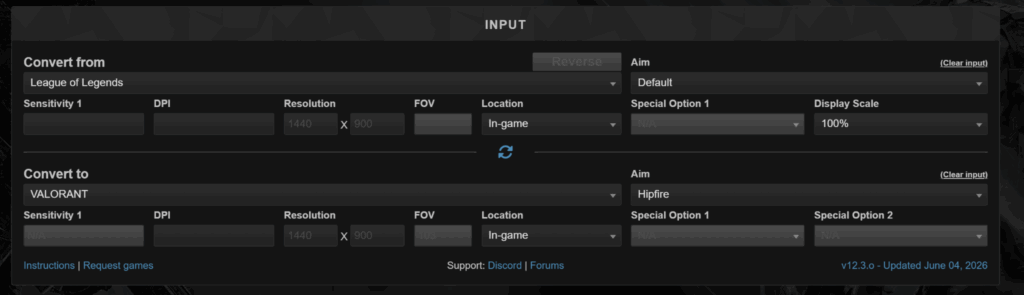
A League of Legends sensitivity converter works on the same idea, mostly for players who change their DPI or jump to a new mouse and want to keep the cursor feel they already trust. You are not converting an aim sensitivity so much as carrying your comfort from the old setup to the new one. Same goal, less guesswork, fewer weeks of feeling off.
Common mistakes and quick fixes
A few traps catch almost everyone who only starts playing with mouth settings. Steer around these, and you will save yourself a lot of frustration.
- Changing DPI and sensitivity at the same time: Now you have two variables moving and no idea which one helped or hurt. Move one thing, test it, then decide.
- Copying a pro and never testing: Their settings fit their hand, their mouse pad, and their desk space. Use their eDPI as a starting line.
- Forgetting Windows pointer settings: Your operating system has its own mouse speed and an acceleration toggle that quietly messes with consistency. Check it once and turn acceleration off.
- Ignoring your number after a new mouse: Fresh mouse, fresh DPI, and suddenly nothing feels right. Two minutes with an eDPI calculator gets your old feel back before you ruin a ranked session.
It helps to remember that there is no perfect setting waiting to be found. A decent setup you have used for months will almost always beat a slightly better one you switched to last night, because your hand has had time to learn it.
Most pros barely touch their settings once they land on something that works. The players who keep chasing the ideal number tend to be the ones who never feel comfortable. Pick something reasonable, stick with it, and let your muscle memory do the rest.
Your number, your game
eDPI takes something fuzzy and makes it readable. Find your number, write it down, and you stop guessing at your settings every time you have an off night. Know your eDPI, make small and deliberate changes, give each one time to sink in, and keep your setup steady once it feels right.
Your hand already knows what good feels like. All you are doing is giving that feeling a name so you can find your way back to it whenever you need to. So run your numbers through an eDPI calculator, settle on a setup you trust, and then get back to playing.
And once your settings are sorted and your head is clear, carry that same calm, measured approach into everything else. If you like to bet on LoL or bet on sports, remember to gamble responsibly and take a look at the newest promos and boosts we have running right now.

